

How To Convert React.js Code Into Next.js
Thinking about upgrading your React application? This complete guide explains how to migrate an existing React.js project into Next.js while improving SEO, performance, routing, image optimization and overall developer experience.

Why Convert React.js To Next.js?
React.js is one of the most popular JavaScript libraries for building modern web applications. However, as projects grow, developers often need better SEO, improved performance, server-side rendering, image optimization, and file-based routing.
Next.js extends React by providing all of these features out of the box. Instead of manually configuring routing, optimization, or rendering strategies, Next.js offers a production-ready framework that simplifies development while delivering faster websites.
Migrating an existing React project might seem difficult, but with the right approach you can move your application step by step without rebuilding everything from scratch.
Why Developers Prefer Next.js
Better SEO
Server Side Rendering
Static Site Generation
Image Optimization
File Based Routing
Excellent Performance
Automatic Code Splitting
API Routes
Built-in Metadata
React.js vs Next.js
| Feature | React.js | Next.js |
|---|---|---|
| SEO | Manual | Built-in |
| Routing | React Router | File Based |
| Images | img | Image Component |
| SSR | No | Yes |
| SSG | No | Yes |
| Performance | Good | Excellent |
| Metadata | Manual | Built-in |
| Deployment | Manual | Optimized |
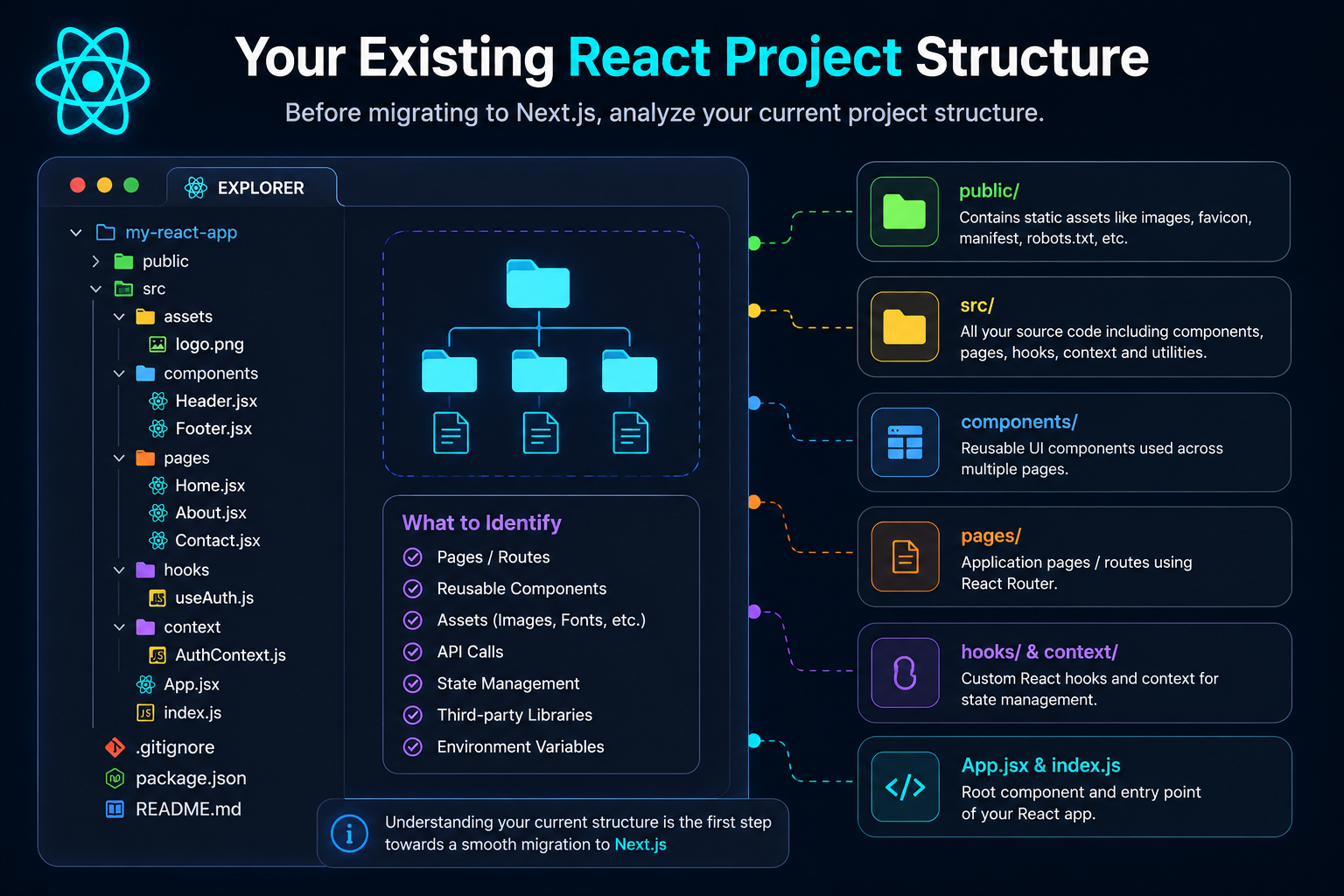
Analyze Your Existing React Project
Before migrating, review your project's structure. Identify reusable components, pages, assets, APIs, and third-party libraries. This helps you understand what can be moved directly and what needs to be rewritten for Next.js.
Replace App.js with Next.js App Router
React applications start from App.js, while Next.js uses the App Router with a page.tsx file inside the app directory.
// App.js

import Home from "./pages/Home";

function App() {
  return <Home />;
}

export default App;// app/page.tsx
import Home from "@/components/Home";
export default function Page() {
return <Home />;
}Create a New Next.js Project
Instead of modifying your existing React project, create a fresh Next.js application. This gives you a clean foundation with the latest App Router, Tailwind CSS support, ESLint configuration, and optimized project structure.
Create your Next.js application
npx create-next-app@latest my-next-app

cd my-next-app

npm run dev
App Router
Uses the modern app directory instead of the traditional pages router.
Tailwind CSS
Automatically configures Tailwind during installation.
TypeScript Ready
Supports JavaScript and TypeScript out of the box.
Move Your React Components
The good news is that most React components work in Next.js without major changes. Simply move your reusable components into the new project and update imports where necessary.
React Project
src/
│
├── components/
│   ├── Navbar.jsx
│   ├── Hero.jsx
│   ├── Footer.jsx
│
├── pages/
├── hooks/
├── assets/
└── App.js
Next.js Project
app/
│
├── components/
│   ├── Navbar.tsx
│   ├── Hero.tsx
│   ├── Footer.tsx
│
├── about/
├── contact/
├── layout.tsx
└── page.tsx
What Should You Copy?
You don't need to copy App.js, index.js, or your React Router configuration. Next.js replaces these with the App Router, layout.tsx, and page.tsx, providing a cleaner and more scalable architecture.
Convert App.js into page.tsx
In React, App.js acts as the root component of your application. In Next.js, every route has its own page.tsx, making routing simpler and more scalable.
React App.js
import Navbar from "./components/Navbar";
import Home from "./pages/Home";
import Footer from "./components/Footer";

function App() {
  return (
    <>
      <Navbar />
      <Home />
      <Footer />
    </>
  );
}

export default App;
Next.js page.tsx
import Navbar from "@/components/Navbar";
import Home from "@/components/Home";
import Footer from "@/components/Footer";

export default function Page() {
  return (
    <>
      <Navbar />
      <Home />
      <Footer />
    </>
  );
}Replace index.js with layout.tsx
React applications start from index.js. Next.js automatically renders every page using layout.tsx, where you define your global layout, fonts, metadata, and providers.
React index.js
import React from "react";
import ReactDOM from "react-dom/client";
import App from "./App";

const root = ReactDOM.createRoot(
  document.getElementById("root")
);

root.render(<App />);
Next.js layout.tsx
import "./globals.css";

export default function RootLayout({
  children,
}: {
  children: React.ReactNode;
}) {
  return (
    <html lang="en">
      <body>{children}</body>
    </html>
  );
}Replace React Router with the App Router
One of the biggest changes when migrating to Next.js is routing. Instead of configuring routes manually with React Router, Next.js automatically creates routes based on your folder structure.
React Router
import {
 BrowserRouter,
 Routes,
 Route
} from "react-router-dom";

<BrowserRouter>

 <Routes>

   <Route
      path="/"
      element={<Home />}
   />

   <Route
      path="/about"
      element={<About />}
   />

   <Route
      path="/contact"
      element={<Contact />}
   />

 </Routes>

</BrowserRouter>
Next.js App Router
app/

├── page.tsx
├── about/
│   └── page.tsx
├── contact/
│   └── page.tsx
└── blog/
    └── page.tsx
Why the App Router is Better
Replace <img> with Next.js Image Component
One of the easiest performance improvements during migration is replacing the standard HTML image tag with Next.js's built-in Image component. It automatically optimizes images, lazy-loads them, and serves modern formats for faster page loads.
React
function Hero() {
  return (
    <img
      src="/images/hero.png"
      alt="Hero Banner"
      className="hero-image"
    />
  );
}
Next.js
import Image from "next/image";

function Hero() {
  return (
    <Image
      src="/images/hero.png"
      alt="Hero Banner"
      width={1400}
      height={800}
      priority
      className="rounded-xl"
    />
  );
}
Automatic Optimization
Images are compressed automatically for better performance.
Lazy Loading
Images outside the viewport load only when needed.
Responsive Images
Next.js serves the best image size for every device.
Improved Core Web Vitals
Better Largest Contentful Paint (LCP) and page speed.
💡 Migration Tip
Move all images into the public/directory and replace every HTML <img> tag with the Image component. This small change alone can significantly improve your Lighthouse performance score.
Move Static Assets to the Public Folder
React projects usually store images, icons, fonts, videos, and other static assets inside the src/assets directory. In Next.js, static files should be placed inside the public folder so they can be served efficiently without importing them into your components.
React Project
src/
│
├── assets/
│   ├── images/
│   │   ├── hero.png
│   │   ├── logo.svg
│   │   └── banner.jpg
│   │
│   ├── icons/
│   ├── videos/
│   └── fonts/
│
└── components/
Next.js Project
public/
│
├── images/
│   ├── hero.png
│   ├── logo.svg
│   └── banner.jpg
│
├── icons/
├── videos/
└── fonts/
React
import hero from "../assets/images/hero.png";

<img
  src={hero}
  alt="Hero"
/>
Next.js
import Image from "next/image";

<Image
  src="/images/hero.png"
  alt="Hero"
  width={1400}
  height={800}
/>
Easy File Access
Reference files directly using /images or /icons.
Better Performance
Assets are served efficiently by Next.js.
Cleaner Imports
No need to import every static image manually.
Production Ready
Works seamlessly in development and production.
📁 Best Practice
Move all images, logos, videos, downloadable files, fonts, and other static assets into the publicdirectory. This keeps your project organized and allows Next.js to serve these files directly without additional imports, improving both maintainability and performance.
Convert CSS Imports
React applications typically import CSS files inside individual components or from index.js. Next.js uses a globalglobals.css file inside the app directory, while component-specific styles should be moved to CSS Modules.
React
// index.js

import "./index.css";
import "./App.css";

<App />
Next.js
// app/layout.tsx

import "./globals.css";

export default function RootLayout({
  children,
}) {
  return (
    <html>
      <body>{children}</body>
    </html>
  );
}
React Component CSS
import "./Hero.css";

function Hero() {
  return (
    <section className="hero">
      Welcome
    </section>
  );
}
Next.js CSS Module
import styles from "./Hero.module.css";

export default function Hero() {
  return (
    <section className={styles.hero}>
      Welcome
    </section>
  );
}
💡 Best Practice
Keep global styles inside globals.css and move component-specific styles into CSS Modules. If you're migrating to Tailwind CSS, you'll gradually replace most custom CSS with utility classes.
Replace Bootstrap Classes with Tailwind CSS
Bootstrap provides predefined components and utility classes, while Tailwind CSS uses utility-first styling. During migration you'll replace Bootstrap classes with Tailwind utilities for better customization, smaller bundles, and improved developer experience.
| Bootstrap | Tailwind CSS |
|---|---|
| container | max-w-7xl mx-auto px-6 |
| row | grid |
| col-md-6 | md:grid-cols-2 |
| btn btn-primary | bg-cyan-500 px-6 py-3 rounded-xl |
| text-center | text-center |
| mt-5 | mt-10 |
| shadow | shadow-xl |
| rounded | rounded-xl |
| d-flex | flex |
| justify-content-between | justify-between |
| align-items-center | items-center |
| img-fluid | w-full h-auto |
Bootstrap
<div className="container">

<div className="row">

<div className="col-md-6">

<h1>Hello World</h1>

<button className="btn btn-primary">

Get Started

</button>

</div>

</div>

</div>
Tailwind CSS
<div className="max-w-7xl mx-auto px-6">

<div className="grid md:grid-cols-2">

<div>

<h1 className="text-5xl font-bold">

Hello World

</h1>

<button
className="mt-6 rounded-xl bg-cyan-500 px-6 py-3 hover:bg-cyan-600"
>

Get Started

</button>

</div>

</div>

</div>
Smaller CSS Bundle
Highly Customizable
Responsive Utilities
Faster Development
🚀 Migration Tip
Start by replacing Bootstrap layout classes such as container, row, and col before converting buttons, cards, spacing, and typography. This incremental approach makes the migration much easier and reduces the risk of breaking your UI.
React to Next.js Migration FAQs
Here are some of the most common questions developers ask when migrating a React.js application to Next.js.
Can I migrate an existing React project to Next.js?+
Yes. Most React components, hooks, Context API, Redux stores, and API calls can be reused. You'll mainly update the routing system, project structure, image handling, and metadata.
Do I need to rewrite my entire application?+
No. Most of your business logic remains the same. You only need to reorganize your project into the Next.js App Router structure and replace a few React-specific features such as React Router.
Can I continue using Axios in Next.js?+
Absolutely. Axios works exactly the same in Next.js. Simply update your environment variables from REACT_APP_* to NEXT_PUBLIC_* if they're used on the client side.
Is React Router required in Next.js?+
No. Next.js includes a built-in file-based routing system. Every folder inside the app directory automatically becomes a route, eliminating the need for React Router.
Should I keep Bootstrap or switch to Tailwind CSS?+
Both work with Next.js. However, Tailwind CSS is commonly chosen for new Next.js projects because it offers smaller CSS bundles, excellent performance, and highly customizable utility classes.
Why should I use next/image instead of img?+
The Image component automatically optimizes images, enables lazy loading, improves Core Web Vitals, and serves responsive images for better performance.
Does Next.js improve SEO?+
Yes. Next.js supports Server-Side Rendering (SSR), Static Site Generation (SSG), dynamic metadata, and faster page loading, making it much more search-engine friendly than a standard React SPA.
Can I use Redux or Context API in Next.js?+
Yes. Both Redux and the Context API are fully supported in Next.js. Simply wrap your application with the appropriate providers inside the Root Layout or a custom Providers component.
Will my React components work in Next.js?+
In most cases, yes. Standard React components can be copied directly into a Next.js project with only minor changes to routing, image handling, or imports.
Is Next.js better than React?+
React is a JavaScript library, while Next.js is a framework built on top of React. If you need SEO, better performance, image optimization, routing, and production-ready features, Next.js is generally the better choice for modern web applications.