

Chat on WhatsApp
CR Guard
CloudRevol
← Back to Blog
Application Security β€’ DevSecOps

Secure Coding Checklist:20 Security Checks While Developing Your App

Security vulnerabilities are easier and less expensive to fix during development than after deployment. This CloudRevol checklist covers twenty practical controls developers should review across input validation, authentication, authorization, APIs, data protection, integrations and software supply-chain security.

Secure Coding Checklist - 20 Application Security Checks
20 Security ChecksApplication SecurityDevSecOpsSecure by Design

Secure Coding Starts Before Production

A firewall or security scanner cannot compensate for authorization mistakes, exposed secrets, unsafe query construction or insecure session handling inside application code. The strongest approach is layered: design securely, write defensive code, test the controls, deploy with safe defaults and continue monitoring after release.

Why Developers Need a Security Checklist

Modern applications depend on APIs, databases, identity systems, third-party integrations and rapidly changing dependencies. Every layer introduces trust decisions. A repeatable checklist helps teams review those decisions consistently instead of relying on memory.

🧱

Build Security In

Prevent weaknesses during design and implementation instead of depending only on production defenses.

πŸ”

Review Consistently

Give developers and reviewers a shared baseline for pull requests, release gates and security testing.

πŸ›‘οΈ

Reduce Attack Surface

Remove unnecessary trust, insecure defaults and overly broad permissions before attackers can abuse them.

πŸš€

Ship With Confidence

Combine secure implementation with automated testing, dependency scanning and production monitoring.

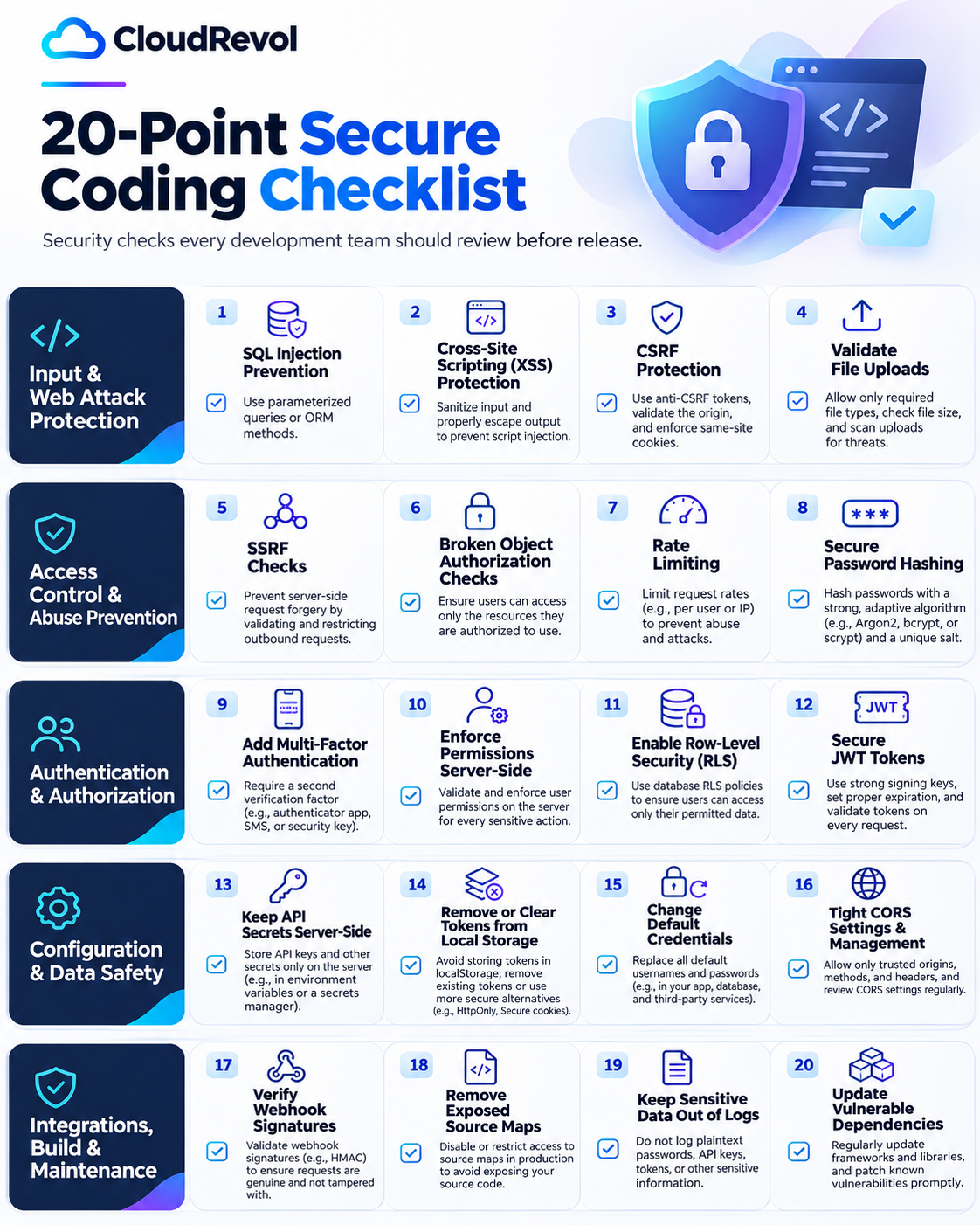
The 20-Point Secure Coding Checklist

Use this as a development review, pull-request checklist or pre-release security gate.

01.Prevent SQL Injection
02.Protect Against Cross-Site Scripting (XSS)
03.Enforce CSRF Protection
04.Validate File Uploads
05.Check for SSRF
06.Prevent BOLA / Broken Object Authorization
07.Add Rate Limiting
08.Hash Passwords Securely
09.Add Multi-Factor Authentication
10.Enforce Permissions Server-Side
11.Enable Row-Level Security (RLS) Where Appropriate
12.Secure JWT Tokens
13.Keep API Secrets Server-Side
14.Avoid Long-Lived Sensitive Tokens in Local Storage
15.Change or Remove Default Credentials
16.Keep CORS Tight
17.Verify Webhook Signatures
18.Do Not Publicly Expose Production Source Maps
19.Keep Sensitive Data Out of Logs
20.Update Vulnerable Dependencies
CloudRevol 20 Point Secure Coding Checklist
Input & Web Attack Protection

Validate every path into your application.

Treat all client-controlled input as untrusted. Validate it early, encode output correctly, and keep dangerous input away from interpreters, filesystems and internal network resources.

01

Prevent SQL Injection

Use parameterized queries, prepared statements or safe ORM query builders instead of concatenating untrusted input into SQL.

Recommended
  • βœ“Bind variables instead of building SQL strings.
  • βœ“Apply least-privilege database accounts.
  • βœ“Validate expected input types and formats.
Avoid

Never concatenate request parameters directly into SELECT, UPDATE, INSERT or DELETE statements.
02

Protect Against Cross-Site Scripting (XSS)

Encode output for the correct context and sanitize user-controlled HTML when rich content must be accepted.

Recommended
  • βœ“Use framework auto-escaping wherever possible.
  • βœ“Sanitize intentionally allowed HTML.
  • βœ“Deploy a restrictive Content Security Policy as an additional layer.
Avoid

Do not inject raw user-controlled strings into HTML, script, style or URL contexts.

03

Enforce CSRF Protection

Protect state-changing browser requests when authentication relies on cookies or other automatically attached credentials.

Recommended
  • βœ“Use anti-CSRF tokens where appropriate.
  • βœ“Set SameSite on session cookies.
  • βœ“Validate Origin or Referer for sensitive operations where practical.
Avoid

Do not assume POST requests are automatically protected from cross-site request forgery.

04

Validate File Uploads

Treat uploads as hostile until proven safe. Validate type, size, content and storage location before making a file available.

Recommended
  • βœ“Allowlist required file types.
  • βœ“Check MIME type and file signature where practical.
  • βœ“Randomize filenames and store uploads outside executable paths.
  • βœ“Apply size limits and malware scanning for higher-risk uploads.
Avoid

Do not trust the filename extension or browser-provided content type by itself.

Access Control & Abuse Prevention

Make authorization decisions on the server.

A secure UI is not a security boundary. Every sensitive object, route and operation must be authorized server-side, with abuse controls around expensive or sensitive actions.

05

Check for SSRF

Restrict server-side requests so attackers cannot make your application access internal services, metadata endpoints or unintended destinations.

Recommended
  • βœ“Allowlist trusted destinations when possible.
  • βœ“Block loopback, private, link-local and cloud metadata ranges where not required.
  • βœ“Re-validate redirects and resolved destinations.
Avoid

Do not fetch arbitrary user-supplied URLs from privileged server networks without controls.

06

Prevent BOLA / Broken Object Authorization

Verify that the authenticated user is allowed to access the specific record or object requested, not just the endpoint.

Recommended
  • βœ“Authorize every object lookup by tenant, owner or role.
  • βœ“Use non-guessable identifiers as defense-in-depth, not as authorization.
  • βœ“Test horizontal and vertical privilege escalation.
Avoid

Never trust an object ID from the client without checking ownership or permission.

07

Add Rate Limiting

Control request volume on authentication, API, search, webhook and resource-intensive endpoints to reduce brute force and abuse.

Recommended
  • βœ“Rate limit by user, token, IP or a combination.
  • βœ“Apply tighter controls to login, password reset and verification endpoints.
  • βœ“Return clear retry behavior such as HTTP 429.
Avoid

Do not rely on a single global limit for every endpoint and user type.

08

Hash Passwords Securely

Passwords should be processed with a purpose-built, adaptive password hashing algorithm rather than general-purpose hashes.

Recommended
  • βœ“Prefer Argon2id where supported.
  • βœ“Use bcrypt or scrypt when appropriate for your stack.
  • βœ“Use unique salts and tune work factors for your environment.
Avoid

Never store plaintext passwords or hash them with fast algorithms such as MD5 or plain SHA-256.

Authentication & Authorization

Protect identities, sessions and privileged actions.

Authentication proves who a user is; authorization decides what that user can do. Keep both controls server-side and add stronger verification around privileged access.

09

Add Multi-Factor Authentication

Require an additional factor for administrators, privileged accounts and high-risk actions.

Recommended
  • βœ“Support passkeys or security keys where possible.
  • βœ“TOTP authenticator apps are a strong widely supported option.
  • βœ“Protect MFA enrollment, reset and recovery flows.
Avoid

Do not treat SMS as your strongest available factor when phishing-resistant options are practical.

10

Enforce Permissions Server-Side

Every protected operation must validate the current user's role, scope and resource permissions on the server.

Recommended
  • βœ“Use deny-by-default authorization policies.
  • βœ“Centralize permission checks where possible.
  • βœ“Test APIs directly without relying on UI restrictions.
Avoid

Hiding a button, route or menu item in the frontend does not enforce authorization.

11

Enable Row-Level Security (RLS) Where Appropriate

For databases that support RLS, database policies can provide an additional boundary that restricts which rows a session can access.

Recommended
  • βœ“Use explicit tenant or user-scoped policies.
  • βœ“Test policies with multiple roles.
  • βœ“Keep application authorization in place as well.
Avoid

Do not assume RLS replaces authentication, API authorization or secure database credentials.

12

Secure JWT Tokens

Treat JWTs as credentials. Validate signature, issuer, audience, expiry and expected algorithm on every trusted boundary.

Recommended
  • βœ“Use strong signing keys and rotate them safely.
  • βœ“Keep access tokens short-lived.
  • βœ“Validate iss, aud, exp, nbf and algorithm expectations.
  • βœ“Design revocation or session invalidation for high-risk systems.
Avoid

Never accept unsigned tokens or dynamically trust the algorithm supplied by an untrusted token.

Configuration & Data Safety

Keep secrets and trust boundaries out of the browser.

Many production breaches are caused by configuration mistakes rather than sophisticated code exploits. Keep credentials private, restrict browser trust, and remove insecure defaults.

13

Keep API Secrets Server-Side

Private API keys, database credentials and signing secrets belong in protected server-side configuration or a secrets manager.

Recommended
  • βœ“Use environment variables or a dedicated secret-management platform.
  • βœ“Rotate secrets when exposure is suspected.
  • βœ“Use separate credentials by environment.
Avoid

Never embed private credentials in frontend JavaScript, mobile bundles or public repositories.

14

Avoid Long-Lived Sensitive Tokens in Local Storage

Anything in localStorage can be read by JavaScript running in the page, so an XSS flaw can expose stored bearer tokens.

Recommended
  • βœ“Prefer HttpOnly, Secure and appropriately scoped SameSite cookies for browser sessions when suitable.
  • βœ“Use short-lived tokens and secure refresh flows.
  • βœ“Clear session material on logout and revocation.
Avoid

Do not keep long-lived high-value bearer tokens in localStorage by default.

15

Change or Remove Default Credentials

Default usernames, passwords, API keys and example accounts are easy targets during automated scanning.

Recommended
  • βœ“Remove sample accounts before production.
  • βœ“Rotate vendor defaults during provisioning.
  • βœ“Disable unused management interfaces.
Avoid

Never ship known default credentials into production environments.

16

Keep CORS Tight

Cross-Origin Resource Sharing should explicitly define which browser origins, methods and headers may access your API.

Recommended
  • βœ“Allowlist exact trusted origins.
  • βœ“Restrict allowed methods and headers.
  • βœ“Review credentialed CORS separately.
Avoid

Do not combine wildcard origins with sensitive credentialed APIs.

Integrations, Build & Maintenance

Secure the code around your code.

Webhooks, build artifacts, logs and third-party packages are part of your attack surface. Treat the delivery pipeline and operational environment as security-sensitive components.

17

Verify Webhook Signatures

Confirm that incoming webhook requests were created by the expected provider and were not modified in transit.

Recommended
  • βœ“Validate HMAC or provider-specific signatures.
  • βœ“Check timestamps and enforce replay windows.
  • βœ“Compare signatures using constant-time functions where applicable.
Avoid

Do not trust a webhook solely because it reaches a secret URL.

18

Do Not Publicly Expose Production Source Maps

Source maps can reveal application structure, original source names and implementation details that make reconnaissance easier.

Recommended
  • βœ“Disable public production source maps when they are not required.
  • βœ“Upload maps privately to error-monitoring platforms when needed.
  • βœ“Restrict access if maps must remain available.
Avoid

Do not unintentionally publish source maps with every production deployment.

19

Keep Sensitive Data Out of Logs

Logs are frequently copied, indexed and retained. Sensitive data written to logs can become a second data exposure.

Recommended
  • βœ“Redact credentials, tokens and authorization headers.
  • βœ“Minimize personal and regulated data.
  • βœ“Apply retention, access control and audit policies.
Avoid

Never log plaintext passwords, private keys, session secrets or full access tokens.

20

Update Vulnerable Dependencies

Your application inherits risk from frameworks, libraries, container images and transitive packages.

Recommended
  • βœ“Commit and review lockfiles.
  • βœ“Run dependency and container vulnerability scanning.
  • βœ“Patch critical issues quickly and test updates.
  • βœ“Track software components with an SBOM where useful.
Avoid

Do not leave abandoned or unsupported dependencies in production indefinitely.

Practical Secure Coding Patterns

The exact implementation depends on your language and framework, but the security principle should remain the same.

Parameterize Database Queries

// Example using a parameterized PostgreSQL query
const result = await db.query(
  "SELECT id, email FROM users WHERE email = $1",
  [email]
);

The user value is bound separately from the SQL statement instead of becoming executable query syntax.

Enforce Authorization on Every Object

// Always scope the lookup to the authenticated user/tenant
const project = await db.project.findFirst({
  where: {
    id: projectId,
    tenantId: session.tenantId
  }
});

if (!project) {
  return new Response("Not Found", { status: 404 });
}

Keep Secrets on the Server

// Server-side only
const apiKey = process.env.PAYMENT_API_SECRET;

if (!apiKey) {
  throw new Error("Missing server-side secret");
}

Verify Webhook Signatures Before Processing

// Pseudocode β€” use your provider's official SDK when available
const valid = verifyWebhookSignature({
  payload: rawBody,
  signature: request.headers.get("x-signature"),
  secret: process.env.WEBHOOK_SECRET
});

if (!valid) {
  return new Response("Invalid signature", { status: 401 });
}
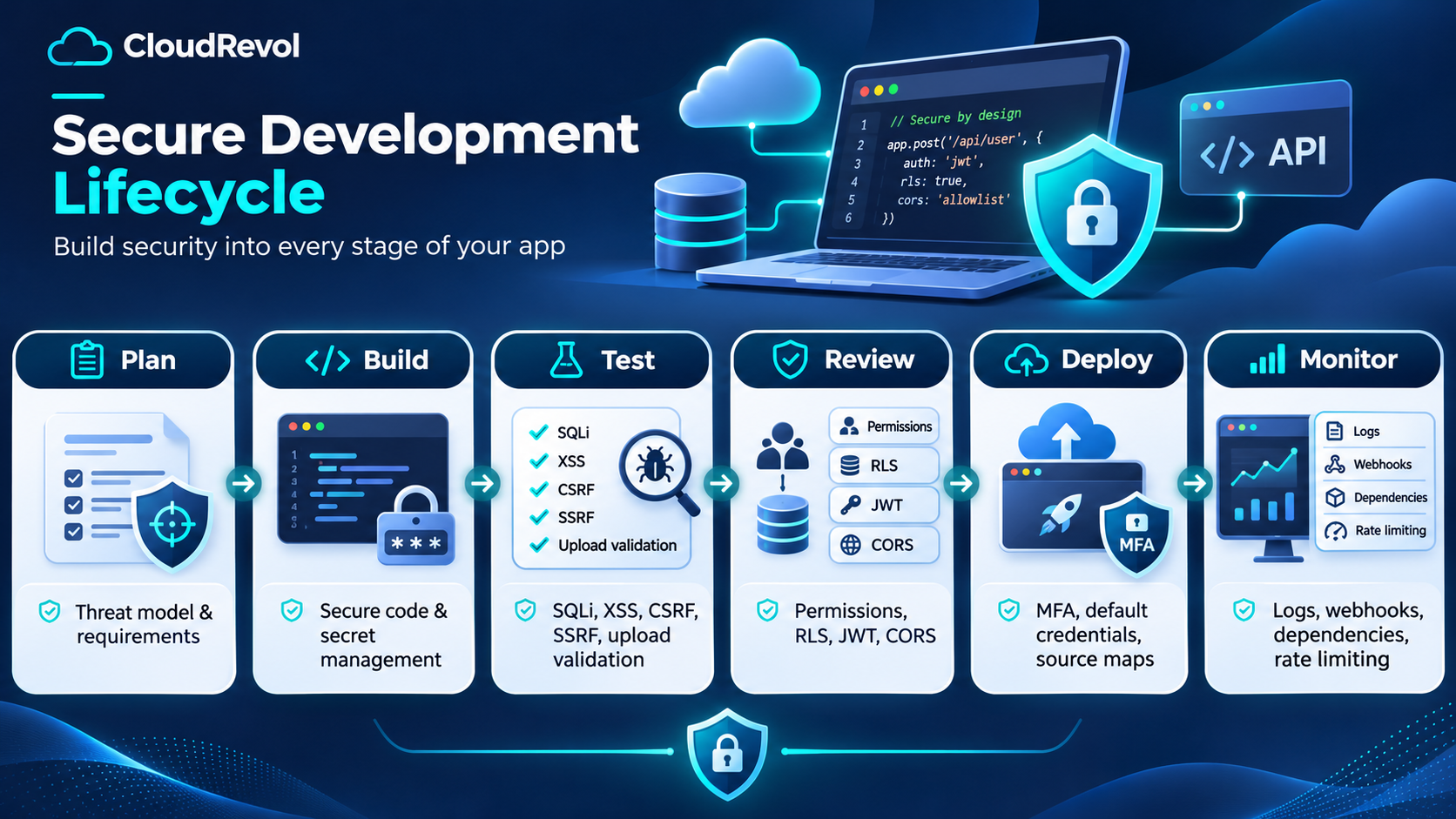
Secure Development Lifecycle

Security Belongs in Every Stage of Development

Secure coding is strongest when it is connected to planning, testing, deployment and monitoring. Threat modeling informs the design, automated checks catch regressions, and production visibility helps teams respond when assumptions change.

Secure Development Lifecycle from planning to monitoring

Pre-Release Security Gate

Before production deployment, confirm that the controls are actually workingβ€”not just present in code.

βœ“Authentication and MFA flows tested
βœ“Authorization and tenant isolation tested
βœ“SQLi, XSS, CSRF and SSRF cases reviewed
βœ“Upload restrictions verified
βœ“Rate limits enabled on sensitive endpoints
βœ“Secrets removed from frontend bundles and repositories
βœ“Production CORS policy reviewed
βœ“Dependency and container scans completed
βœ“Logs checked for token or credential leakage
βœ“Backups, rollback and monitoring ready
Security Is a Team Discipline

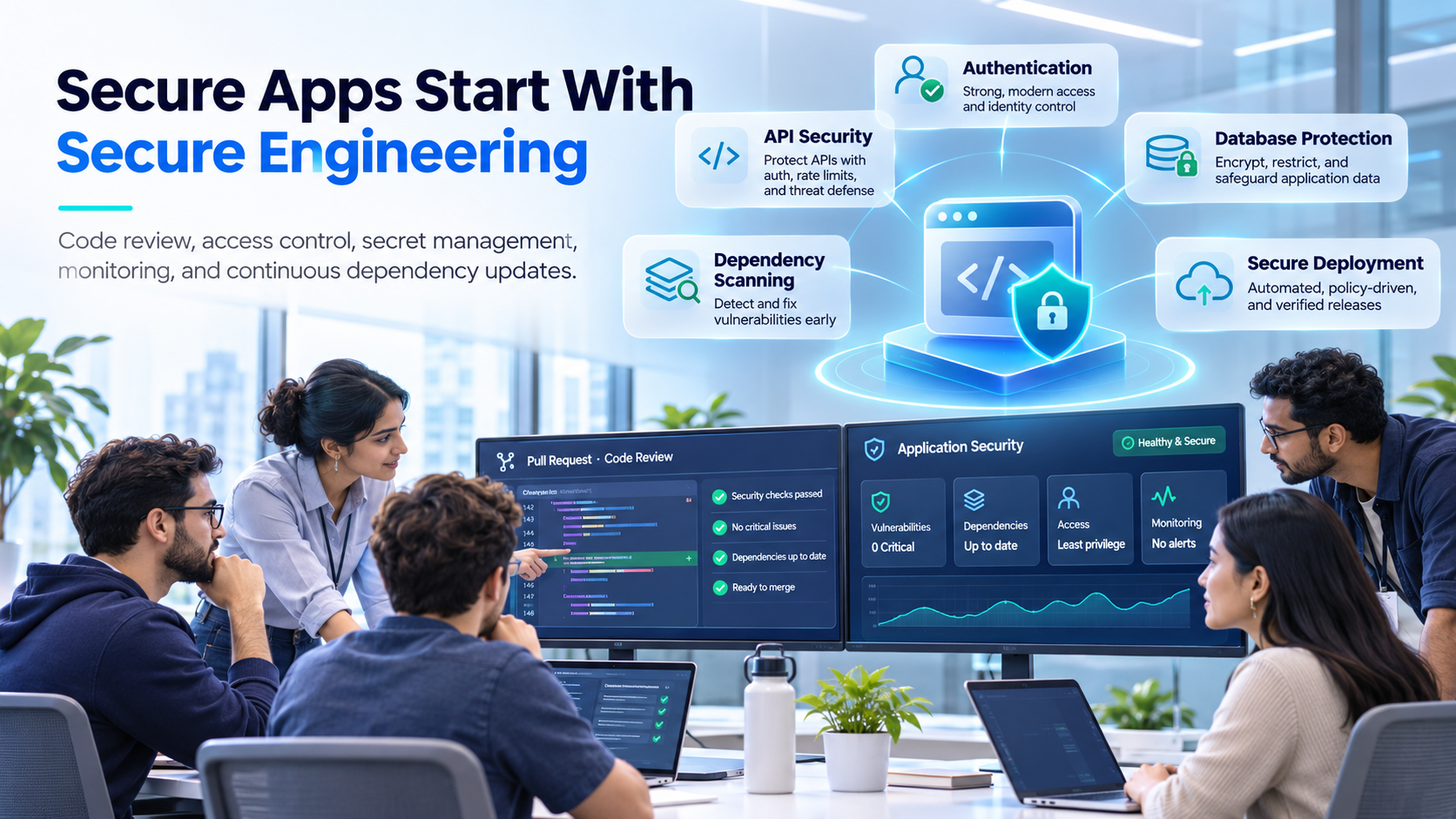
Secure Apps Start With Secure Engineering

Development, infrastructure and security teams need a shared view of risk. Code review, dependency scanning, access control, monitoring and incident response work best when they are part of the same engineering process.

A checklist gives teams a baseline. Automation, code review and continuous monitoring turn that baseline into an operational security practice.

Development team reviewing secure application engineering
CloudRevol DevSecOps

Build Security Into Your Application Delivery Pipeline

CloudRevol helps teams combine managed infrastructure, DevOps automation, security hardening, monitoring, backups and DevSecOps practices so application security continues beyond the source code.

πŸ§ͺ Security Testing
πŸ“¦ Dependency Scanning
πŸ” Secret Management
πŸ“‘ Continuous Monitoring
βš™οΈ Secure Deployments
πŸ›‘οΈ Infrastructure Hardening

Frequently Asked Questions

What is a secure coding checklist?+

A secure coding checklist is a repeatable set of application security controls developers review while designing, building, testing and deploying software. It helps teams catch common weaknesses before they become production incidents.

Should security checks happen only before release?+

No. Security works best when it is built into planning, coding, code review, automated testing, deployment and production monitoring rather than being treated as one final pre-release test.

What is the difference between SQL injection and XSS?+

SQL injection targets database queries by influencing how SQL is interpreted. Cross-site scripting targets browser rendering by causing untrusted content to execute as script or unsafe markup.

What is BOLA?+

Broken Object Level Authorization occurs when an application exposes an object identifier but fails to verify that the current user is authorized to access that specific object.

Is Row-Level Security enough to secure an API?+

No. RLS can be a valuable database-level control, but applications still need authentication, API authorization, secure credentials, validation and other security protections.

Should JWT tokens be stored in localStorage?+

Long-lived sensitive bearer tokens in localStorage increase exposure to XSS because page JavaScript can read them. Browser session designs often benefit from HttpOnly Secure cookies or other short-lived token patterns depending on the application architecture.

Why should production source maps be restricted?+

Source maps can reveal original source structure and implementation details. Teams often keep them private and upload them directly to trusted error-monitoring systems rather than exposing them publicly.

How does CloudRevol help with application security?+

CloudRevol combines managed infrastructure, DevOps, DevSecOps, monitoring, server security, patching, backups and engineering support to help teams operate applications with stronger security controls.

Make Secure Coding Part of Every Release

Use this checklist during development, code review and release planning. Security is not one feature to finishβ€”it is a set of engineering decisions that should be verified continuously.